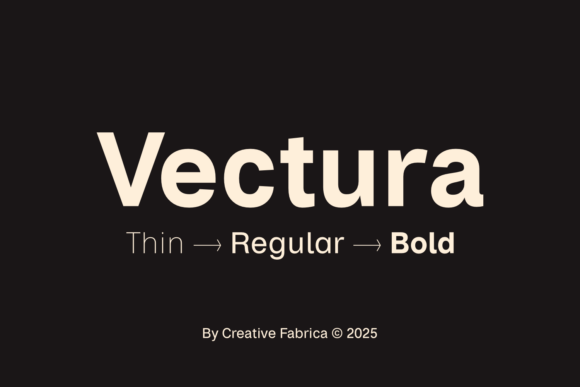
Vectura: The Helvetica-Inspired Sans Serif for Modern Design
There's a quiet power in a font that doesn't scream for attention but commands it anyway. You've seen it in the crispness of a tech startup's logo, the effortless readability of a favorite magazine, or the clean interface of an app you use daily. That sense of modern clarity, of professional calm, is what the Vectura typeface brings to the table. Inspired by the timeless, utilitarian beauty of Helvetica, Vectura is a refined sans-serif font built for today's designer who needs both elegance and unwavering functionality.
Think of Vectura not as a clone, but as an evolution. It takes the legendary neutrality and balance of its inspiration and refines it for contemporary screens and print. The letterforms are meticulously crafted with subtle optical adjustments, ensuring they look perfect whether you're setting a headline at 72 points or body text at 12. This isn't just about looking good; it's about solving real design problems with a typeface that works as hard as you do.
A Typeface for Every Creative Chapter
The true test of a premium font is its versatility. Can it carry the weight of a corporate identity and then pivot to express the whimsy of a wedding invitation? Vectura's six distinct styles—Thin, Regular, Bold, and their italic counterparts—provide the toolkit to answer yes. This range is its superpower.
For a brand identity project, consistency is key. Using Vectura Thin for delicate subheadings and Vectura Bold for impactful logos creates a cohesive visual language from the start. The font's clean geometry ensures your brand looks sharp and trustworthy on a business card, a website header, and a social media profile alike. It's the kind of typeface that helps a small business look established and a corporate entity feel approachable.
From Screen to Shelf: Practical Applications
Let's get specific. Where does Vectura truly shine? The answer is almost everywhere you need clear, professional communication.
- Web Design & Digital Products: Its excellent readability makes it a standout for blog posts, UI text, and e-commerce sites. Users won't strain their eyes, which keeps them engaged longer. Pair Vectura Regular for body text with Vectura Bold for calls to action for a seamless user experience.
- Packaging & Merchandise: On a crowded shelf or a t-shirt design, clarity wins. Vectura's open letterforms and balanced spacing ensure product names and essential details are instantly legible, even from a distance. It gives packaging a sleek, minimalist aesthetic that feels premium.
- Editorial & Marketing Assets: Whether it's a poster, a brochure, or a social media graphic, Vectura provides a clean canvas. It lets your message and imagery take center stage without typographic distractions. For reports, presentations, and PDF guides, it projects an image of competence and clarity.
Matching Font to Function: A Practical Guide
Choosing a font is a strategic decision. Here’s how to think about using Vectura effectively in your projects.
Start with Your Goal. Are you aiming for cutting-edge sophistication? The Thin weight has an airy, delicate feel perfect for luxury branding or minimalist art portfolios. Need a solid, dependable workhorse? Regular is your go-to for extensive text. For headlines that need to punch through the noise, Bold delivers impact without aggression.
Consider Readability First. Always test your chosen weight at the actual size it will be used. Vectura's design prioritizes legibility, but a Thin weight might disappear in small print, while a Bold weight could overwhelm a long paragraph. Use the italics for subtle emphasis or quotes to add dynamism to your layout.
Explore Font Pairing. Vectura's neutrality is a gift for pairing. It plays well with others. For a classic, authoritative look, try pairing it with a refined serif font like Georgia or Playfair Display for headings. For a fully modern, streamlined system, combine different weights of Vectura itself—say, Thin for headers and Regular for body text. If your project calls for a touch of personality, a carefully selected script font or handwritten font for accents can create a beautiful contrast against Vectura's steady lines.
Beyond the Glyphs: The Business of Typography
When you choose a font for commercial work, you're investing in a design asset. Vectura, as a commercial font, comes with the licensing you need for client projects, merchandise, and digital products. This is a critical, often overlooked, aspect of professional practice. Using properly licensed fonts protects you and your clients and ensures your brand's visual identity is legally sound.
Think of your typography as a core component of your brand's voice. The right sans serif font like Vectura doesn't just display words; it communicates values—modernity, efficiency, clarity, and trust. It becomes a silent ambassador for your brand, working tirelessly across every touchpoint to build recognition and credibility.
Ultimately, Vectura offers a bridge between timeless typographic principles and the demands of modern design. It provides the tools to create work that is not only visually appealing but functionally robust. In a landscape crowded with fleeting trends, having a reliable, elegant, and versatile typeface in your toolkit is a strategic advantage that pays dividends in every project you undertake.